
Featured Extensions
2026-09-24
2026-09-23
2026-09-23
2026-09-22

 HikaAuction 6.0.8CjForum 6.6joomla Calc Builder 6.0.2Mosets Tree 4.1.6Quick Index PRO 5.1HikaMarket 6.1.1OSDownloads pro 2.3.4Linky Map 2.8.1CartFlows Pro 3.3.1Astra Pro Addon 4.13.13Smart Manager Pro 9.0.0

 Overview

 Joomla ExtensionsAccess & SecurityAdministrationAds & AffiliatesAuthoring & ContentCalendars & EventsClients & Communitieschats and ForumsContacts & FeedbackContent SharingCore EnhancementsDirectory & DocumentationStyle & DesignSite Managemente-CommerceEditorsFinancialHosting & ServersLanguagesLivingMaps & WeatherMarketingMigration & ConversionMiscellaneousSearch & IndexingMobileMultimediaStructure & NavigationNews DisplayBooking & ReservationsReal Estate and jobsPhotos & SlideshowSocial WebExtension SpecificSports & GamesToolsNewsletterSeo & metadataContent ConstructionformsPopups & iFramesBackupHelp Desk And SupportpollsData Import & ExportTable and listLogin/RegisterMenu SystemsUser & ProfileportfolioTabsRss FeedDatabase Managementdate and timePayments Site Analyticsjoomshoppingk2 extensionsAltaUserPointsVirtueMartHikaShopj2storeDJClassifieds Digicom ExtensionsJoomla TemplatessmartaddonsjoomshaperJoomDev templatesLthemeOrdaSoft Templatesinspirethemevinagecko templatesthemeforestyoothemeShape5Template monsterJoomlashine(JSN) TemplatesRsjoomlaRocket ThemeHOTthemeswarpthemejoomlarthtml templateGavickProBowthemejoomla51bestaddonjoomlabuffJoomla MonsterCmsboldjoomdonationJoomlabambooThemexpertjoomlaplateExtensions for joomlastackideasNooTheme9themestoretemplazamixwebtemplatesagethemesDj-extensionsJoomLeadVirtuemart TemplatesMobile JoomlaUnitemplatesJoomlaschoolWordpress PluginsWP Admin ToolsWP AdvertisingWP BackupWP Popup And IframeWP Calendars & eventWP Coming SoonWP Directory & ListingsWP E-Mail & NewslettersWP FormsWP ForumsWP Photo & GalleriesWP Help Desk – Live ChatWP Import & ExportWP Interface ElementsWP LMSWP Maps & WeatherWP MultiMediaWP User & ProfileWP Menu DesignWP MarketingWP language and speechWP news DisplayWP Page BuilderWP PaymentWp Access & SecurityWP SEO & OptimizeWP sports and GamesWP SliderWP Social Media PluginsWP UtilitiesWP shopWP Login And Registerwp Booking & Reservations wp Search and FiltersEDD PluginsWP file and downloadswp contact & feedbackWP Table and listWP Style & DesignWooCommerce Pluginswordpress Themeswp Blog templateswp BuddyPress templateswp Business templateswp Corporate templateswp Creative templateswp Directory & Listings templateswp eCommerce templateswp Education templateswp Miscellaneous templateswp Mobile templateswp Multi Vendor templateswp Multipurpose templateswp Newspaper – Magazine templateswpReal Estate templateswp Technology templateswp Restaurant templatesMagento ExtensionsPrestashop modulesPrestashop TemplatesSoftwaresLearningother ScriptsMobileApp And Source CodesWeb design & Graphics ToolsFree Downloadfontsshopify TemplatesAI Tools WPDesk - Print Orders and Address Labels WooCommerce
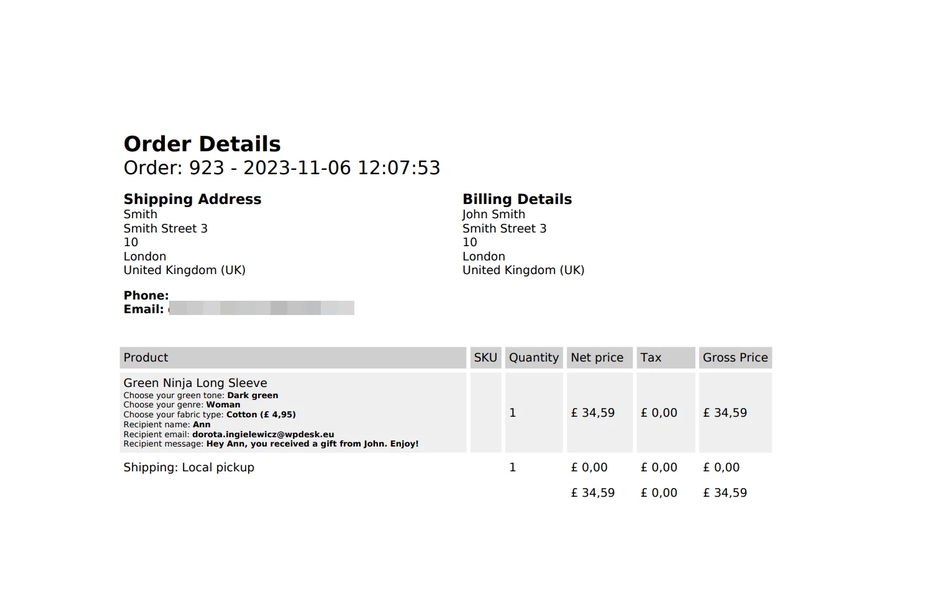
Speed up the fulfillment process, packing, and shipping by printing address labels and order details. Print and send packing slips to your customers. It's easy!
What makes this plugin so good?
Print orders and packing slips in WooCommerce or save them as PDFs!
Print Packing Slips
Speed up the packing process and/or attach order details to the package.
Attach to Customer Emails
Optionally attach PDF packing slips to customer emails.
Attach to My Account
Optionally add packing slips PDF links to My account page.
Print Address Labels
Print address labels for selected orders in bulk and customize their format with a simple wizard and start printing in bulk.
Adjust Columns and Rows
Precisely choose how many columns and rows to print.
Multiple Customization Options
Choose address format, paper/font size, see more below ↓
Plugin highlights
Print WooCommerce Address Labels in Bulk and automatically print and optionally send order details or packing slips to your customers.
All features in brief
Print Orders and Address Labels WooCommerce has multiple options to let you customize your packing slips and address labels.
Print orders slips and labels
✅ Specify the numbers of rows and columns for WooCommerce address label printing.
✅ Your own formatting of the customer data and address.
✅ Specify font size for address labels.
Multiple layout settings
✅ Print WooCommerce order slips with or without page breaks to save paper.
✅ Multiple paper sizes to choose from.
✅ Choose page orientation (portrait, landscape) for address labels.
View Pricing
Improve the communication
✅ Optionally attach PDF order details to customer emails.
✅ Optionally add PDF order details to My account page.
✅ Print order details, i.e. to easily pick the WooCommerce order in the warehouse or to add to the package.
