




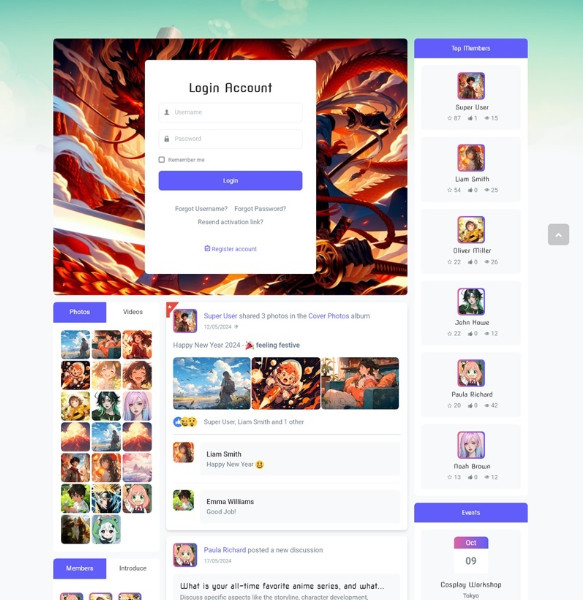
JomSocial Anime Theme gives you an other look and feel for your JomSocial website. All you have to do is copying the theme folder to the "template" folder of JomSocial and select it as default theme.
 JomSocial


JomSocial Game Theme gives you an other look and feel for your JomSocial website. All you have to do is copying the theme folder to the "template" folder of JomSocial and select it as default theme.
When great events are coming up, your members want to know. This module shows the events that are trending right now, making sure that no one misses out!
Do you know the hottest topics your members are discussing? Tracking the hashtags trending over in the past days, weeks and months is a great way to stay on top of your community’s interests. Other members can see these hashtags and join the conversation!
 2022-05-17
This useful module shows your members a map with the locations of their friends or the entire community. When members can see others in their area, they’ll have another opportunity to connect.
This useful module shows your members a map with the locations of their friends or the entire community. When members can see others in their area, they’ll have another opportunity to connect.

This module show the most popular events based on views, likes, number of attendees or posts on the event stream. You can also restrict suggestions to events of a specific category.

JomSocial Shadow Theme comes with shadow customized styles for a JomSocial website. All you have to do is copying the theme folder to the "template" folder of JomSocial and select it as default theme.
The JS Toolbar module puts a bar on the top of your website, with a login area, avatar, alerts, search box and access to settings. The toolbar can be shown on every page of your community, making sure that your members don’t miss any important alerts or messages while they are browsing. Alerts make your website truly engaging and addictive. They bring people back.